
Photo DVD Maker Support Center - FAQs about orders, registrations, functions & contact
How to set language preference for Photo DVD Maker
Photo DVD Maker offer multilingual user interface in addition to its friendly navigation. Currently, users can choose following languages to use the photo slideshow program:
| English | French | Japanese | Russian |
| Deutsch | Simplified Chinese | Arabic | Turkish |
| Czech | Italiano |
The Photo DVD Maker program will auto-detect the language of your operating system and select a language accordingly.
Set language preference for Photo DVD Maker
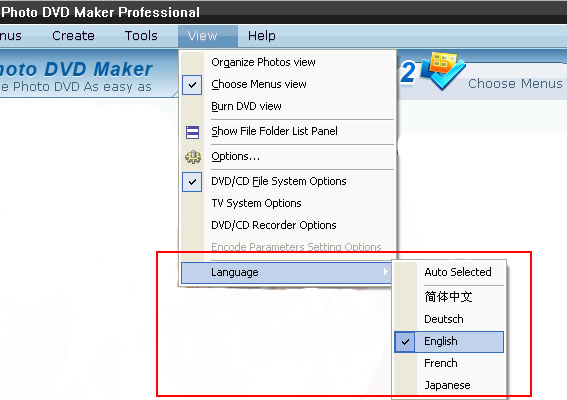
You can set your language preference for using the photo slideshow program. To change language option, go to the menu “View > Language”, and choose one of the available languages.
Translate Photo DVD Maker to your language
If your preferential language is not available and you would volunteer to translate a version for the program, you are welcome to contact us for details on how to do that. We always appreciate volunteers who help us translate the photo slideshow software into more languages.
Voluntary translators please send your intension to support@photo-dvd-maker.com
We will provide anything necessary to assist you carry out and complete the translation of the photo slideshow program.